
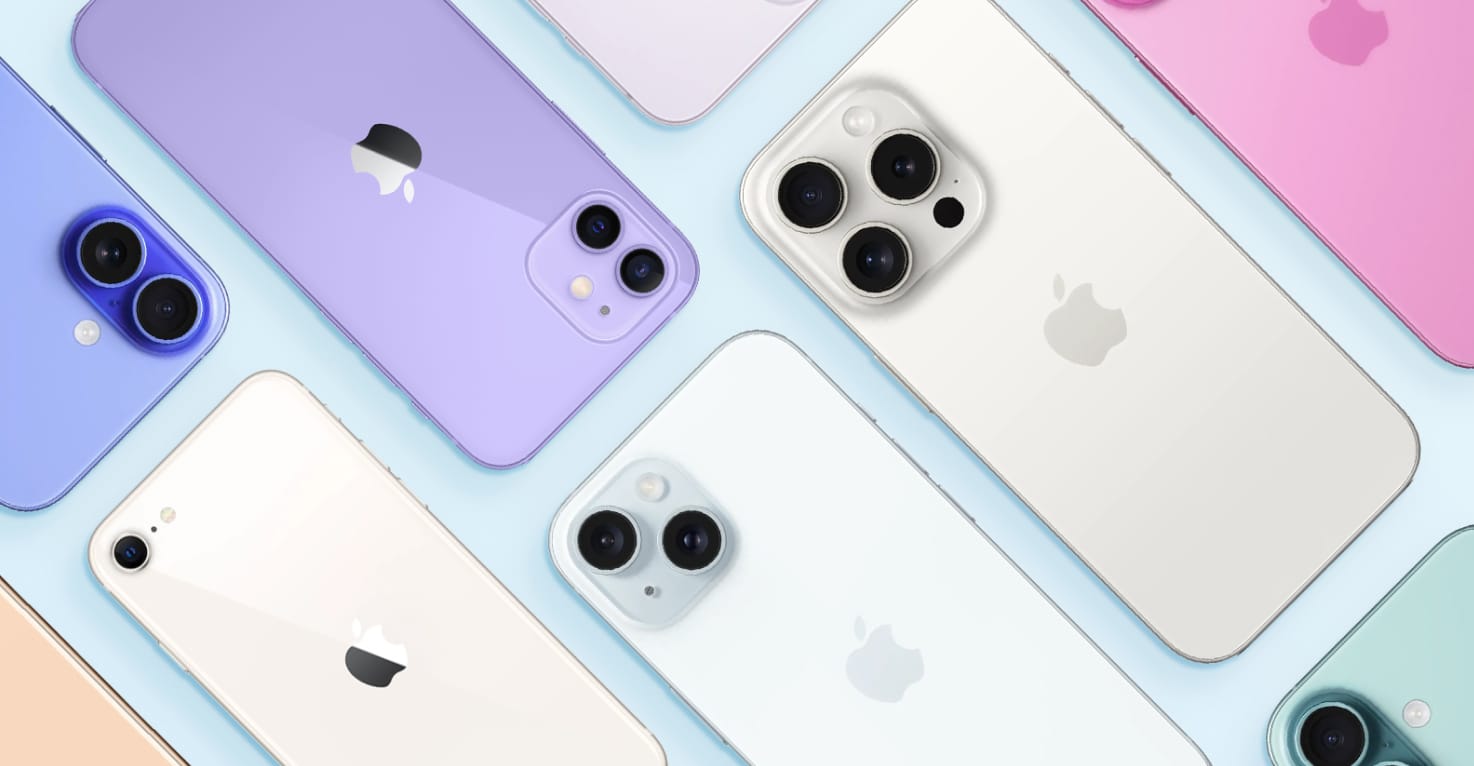
Which iPhone do I have? Find out here!
Which iPhone do I have? Find out here!
There are now many different iPhone models on the market, so it's perfectly understandable if you're not quite sure which one you have. On this page, we'll walk you through how to identify your model step by step. That way, you can be confident you're choosing the right iPhone case and accessories for your device.
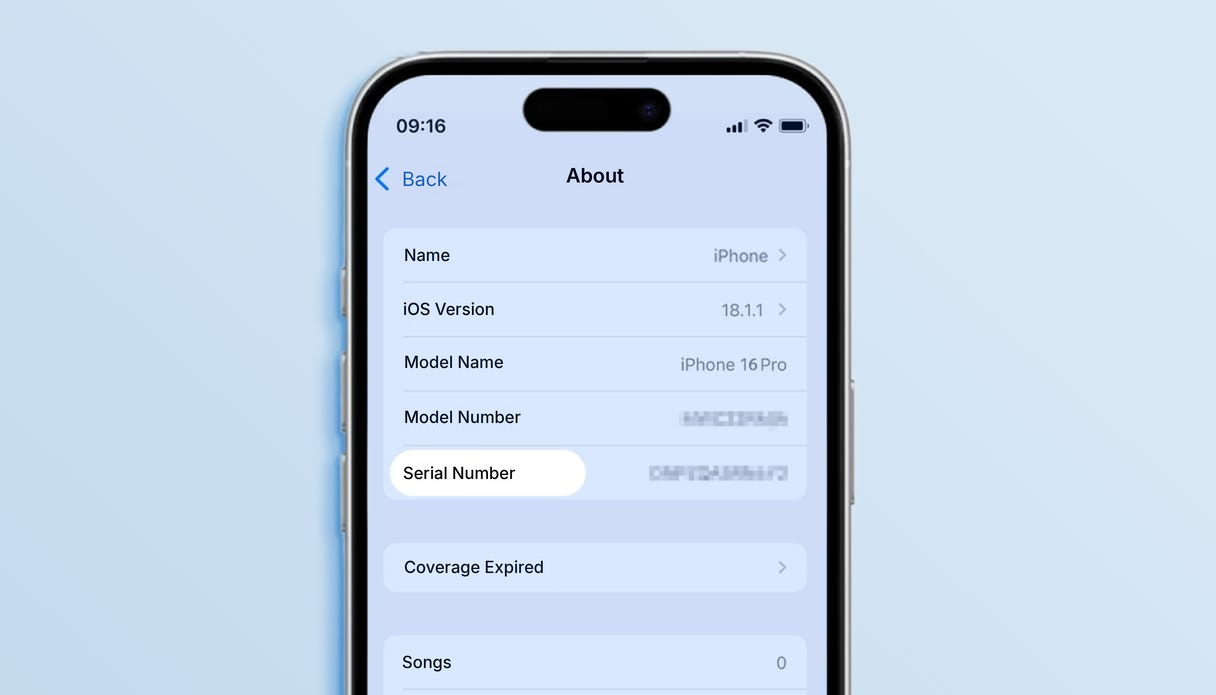
You can check this quickly via Settings > General > About. This shows the exact model name of your iPhone.
Looking for a case for one of the latest models? Go straight to:
Simply select your model and explore a wide range of cases and accessories tailored to your iPhone.
How can you tell which iPhone you have?
There are several ways to find out which iPhone you have, for example by looking up the model or model number. The model number always starts with the letter "A," followed by four digits (for example "AXXXX"). Using this A-number, you can find the correct iPhone model in the search bar at the bottom of the page.
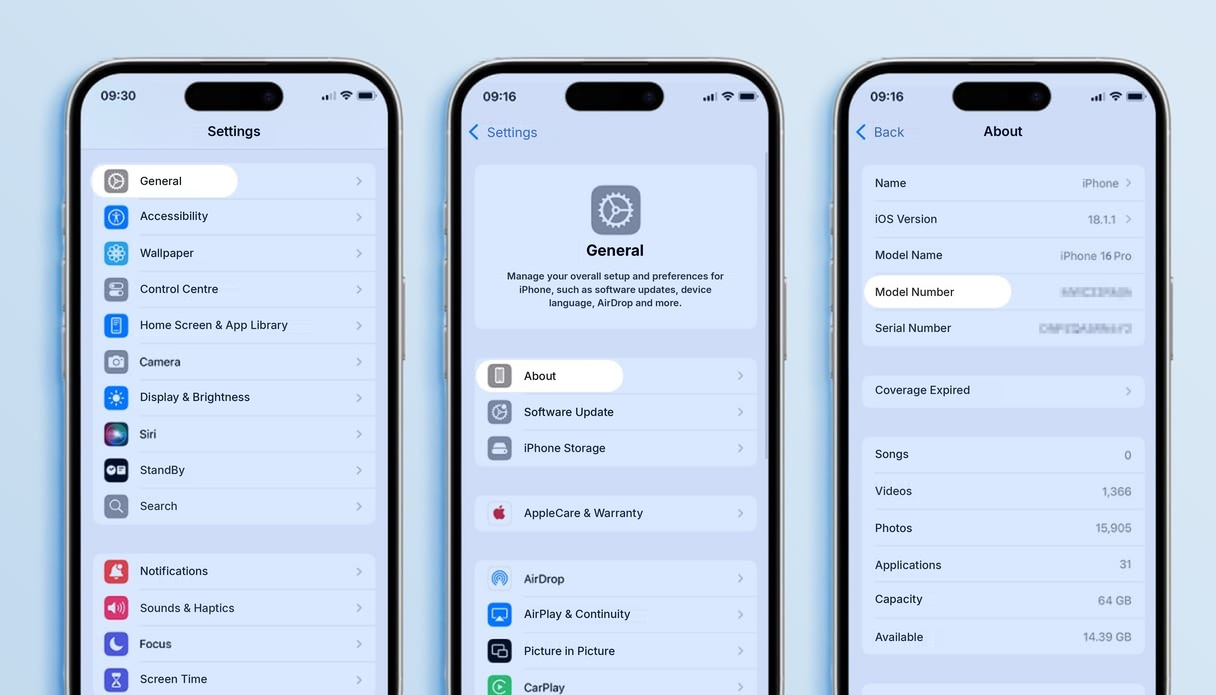
Find the model number via the settings
- Open Settings on your iPhone
- Go to General
- Tap About. Here you'll find the model name
- Can't see a model name? Under model number, you'll find a number starting with "M", such as MLPF3ZD/A (this number varies per iPhone)
- Tap on the model number to see the A-number
- Search for the A-number in the search bar at the bottom of this page
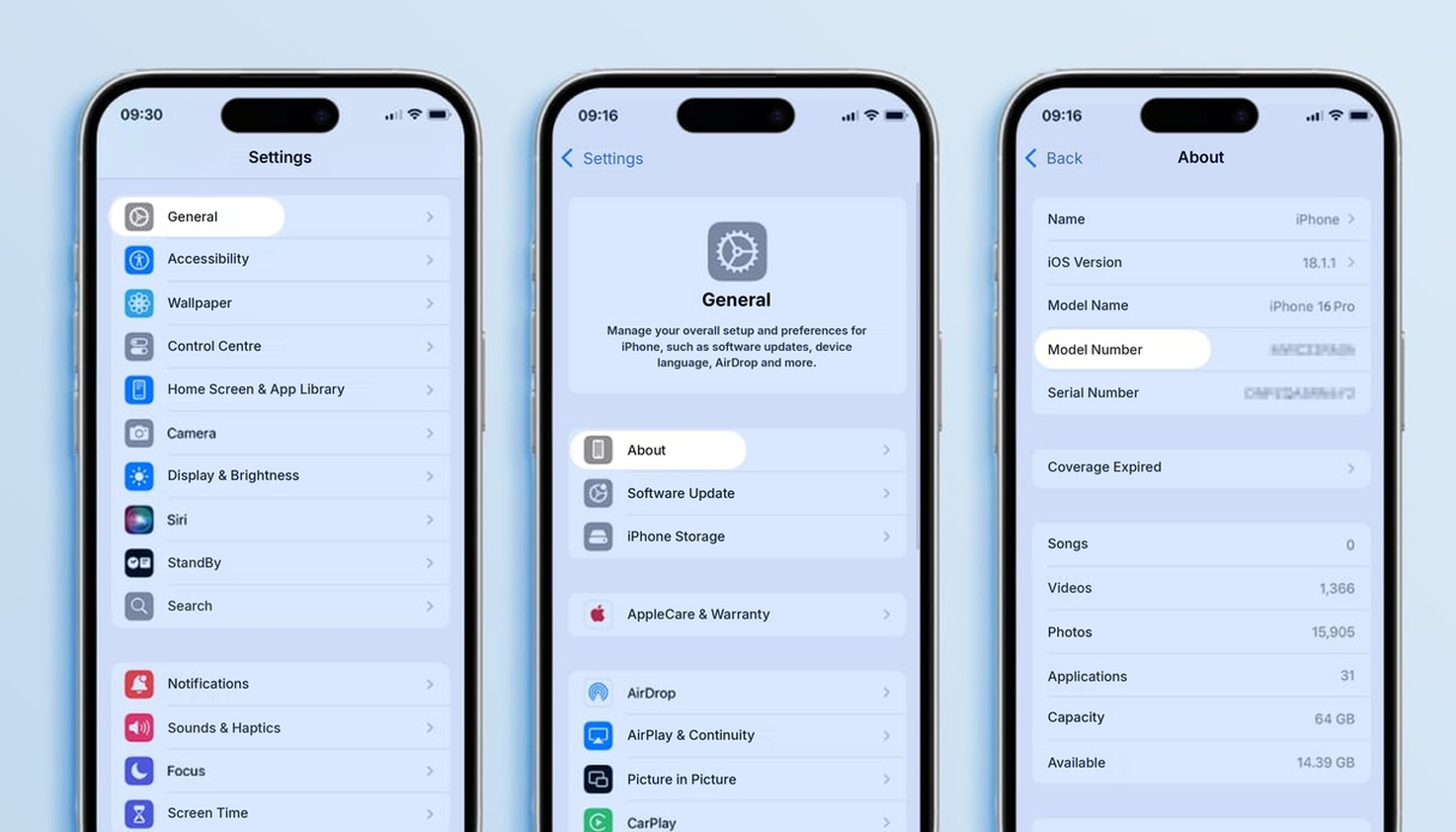
Find the model number via the settings
- Open Settings on your iPhone
- Go to General
- Tap About. Here you'll find the model name
- Can't see a model name? Under model number, you'll find a number starting with "M", such as MLPF3ZD/A (this number varies per iPhone)
- Tap on the model number to see the A-number
- Search for the A-number in the search bar at the bottom of this page
Find the model number on your device
Have an iPhone 8 or a newer model? You can also find the model number in the SIM card tray. Remove the SIM card tray and look into the slot; using a torch, you can see the model number printed on the inner edge.
If you have an iPhone 7 or older, the model number is printed on the back of the device.
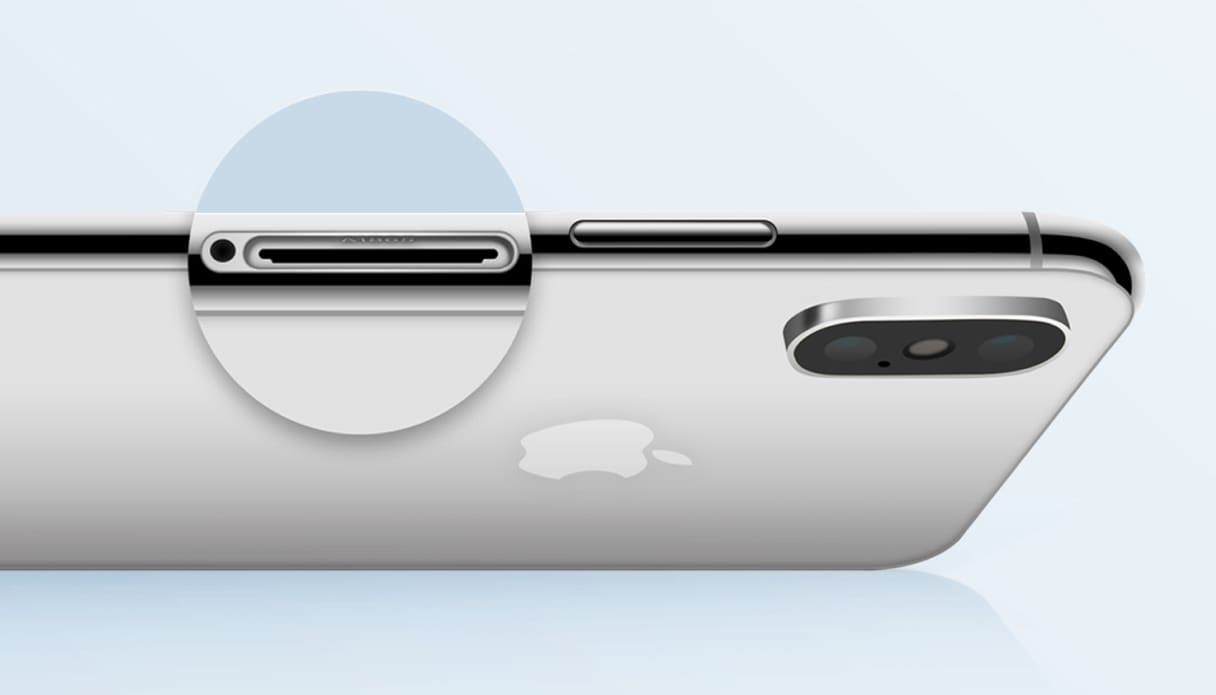
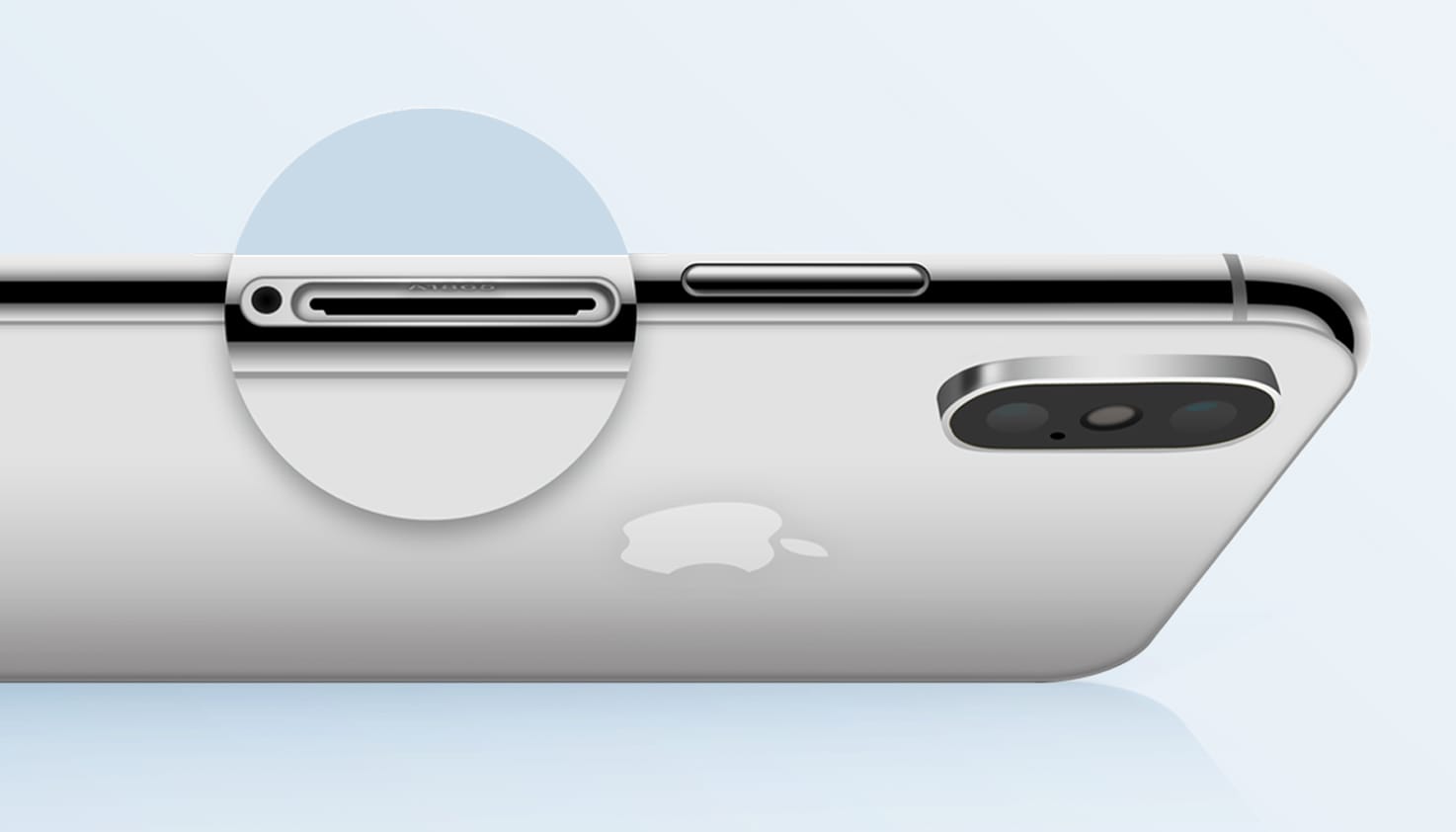
Find the model number on your device
Got an iPhone 8 or newer? You can find the model number in the SIM card tray. Remove the tray and look into the opening; using a torch, you can read the model number on the inner edge.
If you have an iPhone 7 or older, the model number is printed on the back of the device.
How old is your iPhone?
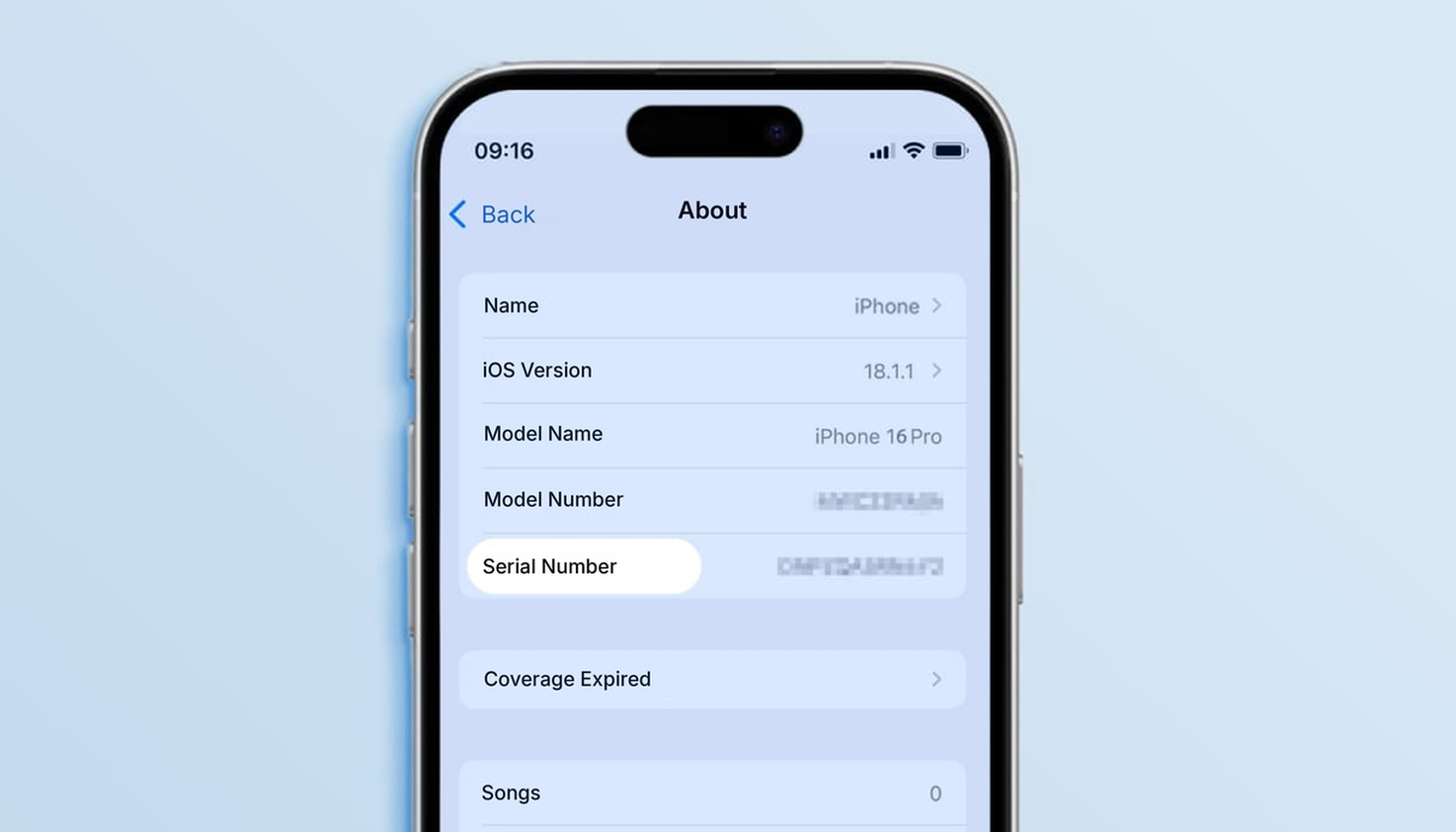
Curious about when you bought your iPhone? Follow the steps below to find out quickly.
- Open Settings on your iPhone
- Go to General
- Tap About and find the serial number for your iPhone
- Visit the Apple > Support > Check Coverage
- website and enter your serial number
- In the overview, you'll see the purchase date of your iPhone and whether your coverage has expired
- Want to know when your iPhone model was released? Use the search bar at the bottom of the page.
How old is your iPhone?
Curious about when you bought your iPhone? Follow the steps below to find out quickly.
- Open Settings on your iPhone
- Go to General
- Tap About and find the serial number for your iPhone
- Visit the Apple > Support > Check Coverage
- website and enter your serial number
- In the overview, you'll see the purchase date of your iPhone and whether your coverage has expired
Want to know when your iPhone model was released? Use the search bar at the bottom of the page.
Which iPhones are there?
Quite a few iPhones have been released over the years. Once you've followed the steps, you'll know your device's model number. Look it up in the table below to find out exactly which iPhone you have.
Enter your iPhone model number here:
| A3720, A3447, A3719, A3721 | iPhone Duo | 09-09-2026 | USB-C & MagSafe |
| A3473, A3716, A3717, A3718 | iPhone 18 Pro Max | 09-09-2026 | USB-C & MagSafe |
| A3472, A3713, A3714, A3715 | iPhone 18 Pro | 09-09-2026 | USB-C & MagSafe |
| A3257, A3525, A3526, A3527 | iPhone 17 Pro Max | 19-09-2025 | USB-C & MagSafe |
| A3256, A3522, A3523, A3524 | iPhone 17 Pro | 19-09-2025 | USB-C & MagSafe |
| A3258, A3519, A3520, A3521 | iPhone 17 | 19-09-2025 | USB-C & MagSafe |
| A3260, A3516, A3517, A3518 | iPhone Air | 19-09-2025 | USB-C & MagSafe |
| A3575, A3634, A3635 | iPhone 17e | 02-03-2026 | USB-C & MagSafe |
| A3296, A3084, A3295, A3297 | iPhone 16 Pro Max | 20-09-2024 | USB-C & MagSafe |
| A3293, A3083, A3292, A3294 | iPhone 16 Pro | 20-09-2024 | USB-C & MagSafe |
| A3290, A3082, A3289, A3291 | iPhone 16 Plus | 20-09-2024 | USB-C & MagSafe |
| A3287, A3081, A3286, A3288 | iPhone 16 | 20-09-2024 | USB-C & MagSafe |
| A3409, A3212, A3408, A3410 | iPhone 16e | 19-02-2025 | USB-C |
| A2849, A3105, A3106, A3108 | iPhone 15 Pro Max | 22-09-2023 | USB-C & MagSafe |
| A2848, A3101, A3102, A3104 | iPhone 15 Pro | 22-09-2023 | USB-C & MagSafe |
| A3094, A2847, A3093, A3096 | iPhone 15 Plus | 22-09-2023 | USB-C & MagSafe |
| A3090, A2846, A3089, A3092 | iPhone 15 | 22-09-2023 | USB-C & MagSafe |
| A2894, A2651, A2893, A2896, A2895 | iPhone 14 Pro Max | 16-09-2022 | Lightning & MagSafe |
| A2890, A2659, A2889, A2892, A2891 | iPhone 14 Pro | 16-09-2022 | Lightning & MagSafe |
| A2886, A2632, A2885, A2888, A2887 | iPhone 14 Plus | 16-09-2022 | Lightning & MagSafe |
| A2882, A2649, A2881, A2884, A2883 | iPhone 14 | 16-09-2022 | Lightning & MagSafe |
| A2783, A2595, A2785, A2782, A2784 | iPhone SE (2022) | 18-03-2022 | Lightning |
| A2643, A2484, A2641, A2644, A2645 | iPhone 13 Pro Max | 24-09-2021 | Lightning & MagSafe |
| A2638, A2483, A2636, A2639, A2640 | iPhone 13 Pro | 24-09-2021 | Lightning & MagSafe |
| A2628, A2481, A2626, A2629, A2630 | iPhone 13 Mini | 24-09-2021 | Lightning & MagSafe |
| A2633, A2482, A2631, A2634, A2635 | iPhone 13 | 24-09-2021 | Lightning & MagSafe |
| A2411, A2342, A2410, A2412 | iPhone 12 Pro Max | 13-11-2020 | Lightning & MagSafe |
| A2407, A2341, A2406, A2408 | iPhone 12 Pro | 23-10-2020 | Lightning & MagSafe |
| A2403, A2172, A2402, A2404 | iPhone 12 | 23-10-2020 | Lightning & MagSafe |
| A2399, A2176, A2398, A2400 | iPhone 12 Mini | 13-11-2020 | Lightning & MagSafe |
| A2783, A2595, A2785, A2782, A2784 | iPhone SE (2020) | 24-04-2020 | Lightning |
| A2218, A2161, A2220 | iPhone 11 Pro Max | 20-09-2019 | Lightning |
| A2160, A2215, A2217 | iPhone 11 Pro | 20-09-2019 | Lightning |
| A2111, A2221, A2223 | iPhone 11 | 20-09-2019 | Lightning |
| A1921, A2101, A2102, A2103, A2104 | iPhone Xs Max | 21-09-2018 | Lightning |
| A1920, A2097, A2098, A2099, A2100 | iPhone Xs | 21-09-2018 | Lightning |
| A1984, A2105, A2106, A2107, A2108 | iPhone Xr | 26-10-2018 | Lightning |
| A1865, A1901, A1902 | iPhone X | 03-11-2017 | Lightning |
| A1864, A1897, A1898 | iPhone 8 Plus | 22-09-2017 | Lightning |
| A1863, A1905, A1906 | iPhone 8 | 22-09-2017 | Lightning |
| A1661, A1784, A1785 | iPhone 7 Plus | 16-09-2016 | Lightning |
| A1660, A1778, A1779 | iPhone 7 | 16-09-2016 | Lightning |
| A1723, A1662, A1724 | iPhone SE (2016) | 31-03-2016 | Lightning |
| A1634, A1687, A1699 | iPhone 6(s) Plus | 25-09-2015 | Lightning |
| A1633, A1688, A1700 | iPhone 6s | 25-09-2015 | Lightning |
| A1522, A1524, A1593 | iPhone 6 Plus | 19-09-2014 | Lightning |
| A1549, A1586, A1589 | iPhone 6 | 19-09-2014 | Lightning |
| A1453, A1457, A1518, A1528, A1530, A1533 | iPhone 5s | 20-09-2013 | Lightning |
| A1428, A1429, A1442 | iPhone 5 | 20-09-2013 | Lightning |
Frequently asked questions about Apple iPhones
What is the latest Apple iPhone model?
Apple’s latest iPhones are the iPhone 18 Pro and iPhone 18 Pro Max. Apple unveiled them on 9 September 2026, and they have been available in shops since 18 September. At the same time, Apple also unveiled the first foldable iPhone: the iPhone Duo. It is due to be released at the end of October 2026.
The standard iPhone 18 isn’t available yet. Apple is releasing this series in two parts, and we don’t expect the base model until spring 2027. Until then, the iPhone 17 remains the latest base model.
Why should I avoid buying the iPhone 12 series?
In September 2023, the iPhone 12 came under scrutiny worldwide after French authorities pulled the model from sale. The iPhone 12 was found to emit radiation levels that exceeded legal limits. This prompted further investigations by other European countries. Apple maintains that the tests carried out by the French authorities do not meet international standards and that the iPhone 12 is perfectly safe to use. Apple also addressed the issue in France through the iOS 17.1 update, which brought radiation levels in line with French measurements.